Changelog

Everything new in Get: launches, improvements and fixes.

Boards: a canvas for your creative research

Every creative project starts with research: references, moodboards, loose ideas, links. Until now that lived scattered across Pinterest, notes and download folders. Boards brings it into Get, right next to your budgets.

A free-form canvas

A board is an infinite canvas where you can drop whatever you need:

  • Images: drag files in or paste straight from the clipboard, with optional captions.
  • Links and embeds: paste a Pinterest or Instagram link and it lands as an image on the board, ready to move and crop.
  • Docs: long-form text blocks with a Notion-style editor, including a slash menu, toggles and a formatting menu.
  • Cards: group related blocks into cards to keep things organized.

Everything moves, duplicates and groups with a context menu, copy/paste and shortcuts. If you come from Figma, alt-drag to copy works the way you expect.

Connect ideas

You can draw directed connections between elements and label them: "inspiration", "discarded", "final version", whatever you need. And when a board grows, semantic layouts reorganize the content for you.

Edit images with AI

Select any image on the board and ask the AI for changes: variations, adjustments, compositions. Every edit keeps a version history, so you can always go back. There is also non-destructive cropping: you crop without losing the original.

With your team and on your phone

Boards are shared just like budgets: invite your team with roles, or share a read-only public link. And they work fully in the iOS app: you can review, edit and invite collaborators from your phone.

Where to find them

Boards live in your dashboard, mixed in with your recent budgets. Create one from the create button and start dropping references.

Get for iOS is now on the App Store

Get now lives on your iPhone too. The app is available on the App Store on every plan.

What you can do from your phone

  • Full budgets: create and edit budgets with the same line and category model as on desktop, synced in real time with your team.
  • Expenses on set: record movements and real expenses where they happen, without waiting to get back to your computer.
  • Ask Get: chat with your budgets, ask for totals, expenses and charts, and get answers built from your real data.
  • Quotes ready to send: turn a budget into a branded quote and export it from your phone.
  • Boards in your pocket: review and edit your reference boards, and invite collaborators from the app.

Synced with desktop

It is not a stripped-down side version: it is the same workspace. Whatever you edit on your phone shows up instantly on desktop and vice versa, including your team's presence when they edit the same budget.

Get it

Search for "Get for Creatives" on the App Store or visit Get for iOS to learn more. Android comes later.

New MCP: connect Claude or Codex to Get

MCP in beta

Get now has a remote MCP server for connecting assistants like Claude or Codex to your workspace.

MCP (Model Context Protocol) lets an assistant understand real Get data and run scoped actions without making you copy and paste context manually. The connection uses OAuth: you sign in to Get, choose the workspace and can revoke access whenever you need to.

MCP is available on every plan and marked as beta while we keep improving permissions, response quality and compatibility with more MCP clients.

What it can do

The first toolset covers the production operating flow:

  • Search clients, projects and budgets.
  • Read the details of a client, project or budget.
  • Create and update clients, folders/projects and budgets.
  • Move budgets between projects.
  • Record movements and actuals.
  • List actuals by workspace, budget, status or date range.
  • See a workspace summary with pipeline and real cashflow by currency.

The goal is to let you ask things like "show me sent budgets in USD", "record this real expense against the budget" or "give me a summary of the quarter" from the assistant you already use.

Better financial context

We also improved the data MCP exposes so it is not just a flat list of records.

The workspace summary now separates two important views: pipeline, with open budgets grouped by status, and realized, with paid income and expenses during the selected period. Everything is grouped by currency, so the assistant does not mix CLP, USD or other currencies when answering.

Actuals are now part of the protocol too. You can ask for real expenses across the workspace or filter them by budget, status and date. That makes the assistant useful for day-to-day production questions, not only initial budgeting.

Setup from Settings

We added an MCP section in Settings with the server URL ready to copy.

From there you can choose Claude or Codex, copy the server URL and follow the client-specific steps. For Codex, Get shows the terminal commands to add the server and start the OAuth login flow.

More control and traceability

Each connected app is authorized per workspace. It does not get global access to all your data: you choose the workspace during authorization and can revoke the connection from the same section.

We also added metadata so MCP clients better understand which tools are read-only and which ones write data. Tool calls are audited, and errors now include a request_id so support can find the relevant log faster when something fails.

What's next

We will keep iterating on three fronts: more useful actions, clearer answers for financial workflows and a less manual setup experience as MCP clients mature.

If you already use Claude or Codex for work, this is the first step toward letting the assistant operate with real Get context instead of working blind.

Budget templates: build your own and reuse them

Build your own templates

If you quote the same kind of project over and over, you no longer have to copy-paste from your last budget. You can now create your own templates: define the structure once —categories, line items and settings— and reuse it every time you build a budget.

Three ways to use them

  • Build one from scratch. In Resources you create a new template and edit it with the same editor you use for your budgets.
  • Save a budget as a template. Happy with how one turned out? Save it as a template and keep its structure and settings for next time.
  • Apply it whenever you need it. While building a budget, apply a template to seed its lines — appending them to what you already have or replacing everything.

Your templates live in your workspace and are yours alone. Editing a template never touches the budgets you've already created.

Try it

Open Resources from the menu and create your first template. If you quote often, it's the fastest way to never start from scratch again.

Benja

New exporter, AI with voice mode and boleta support

New budget exporter

Before, your budgets came out as a generic PDF, the same for everyone. The exporter is now ultra-customizable: you build the document in blocks, change the structure, add your own sections, and the PDF looks exactly how you want to present it to your client.

If you haven't exported a budget in a while, it's worth jumping in and trying it. It's probably the most visible change.

Much more capable AI

The Get agent took a big leap:

  • Better context awareness. It doesn't just look at the current budget, it can also read your other projects as reference. If you built something similar two months ago, the agent uses it to suggest things consistent with how you quote.
  • Voice mode: you can now talk to the agent instead of typing. Useful when you're reviewing something quickly or putting together a budget from your phone.

Guests

You can now invite people to a specific project without adding them to your workspace. Useful for clients, external production companies, or one-off collaborators who only need to see or work on a single project, not your entire operation.

Guests are free. You get a limit based on your plan, but they don't add extra cost to the workspace.

If you have people who work directly in your team, you add them as Members. Each one gets their own quota and full access to work across all projects.

Boleta support (Chile)

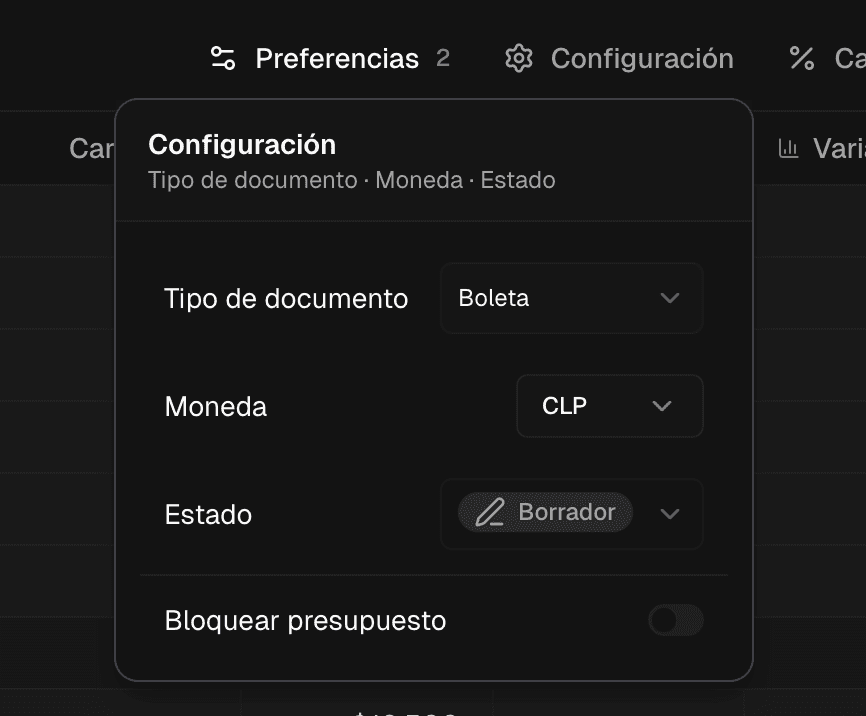
Chile-specific: several freelancers asked for this. You can now mark a document as a boleta and the calculation adjusts automatically (no automatic SII filing yet, that's coming later).

Boleta option in the exporter

Net VAT

Calculations are now net by default, which is how most of you actually budget. Less friction, fewer errors.

What's next

Our next focus is 100% analytics. We want to make your business analytics much easier to use and better tailored to your needs. Anything you want to see, tell us from inside the app.

If you haven't logged in for a while, now's a good time. And if you run into something weird or have feedback, write me directly. I read everything.

Benja

Changelog | Get